Interface
Magnolia's window has two parts: the ribbon along the top, where you find Magnolia's commands, and the panes below it, where you work with your project.
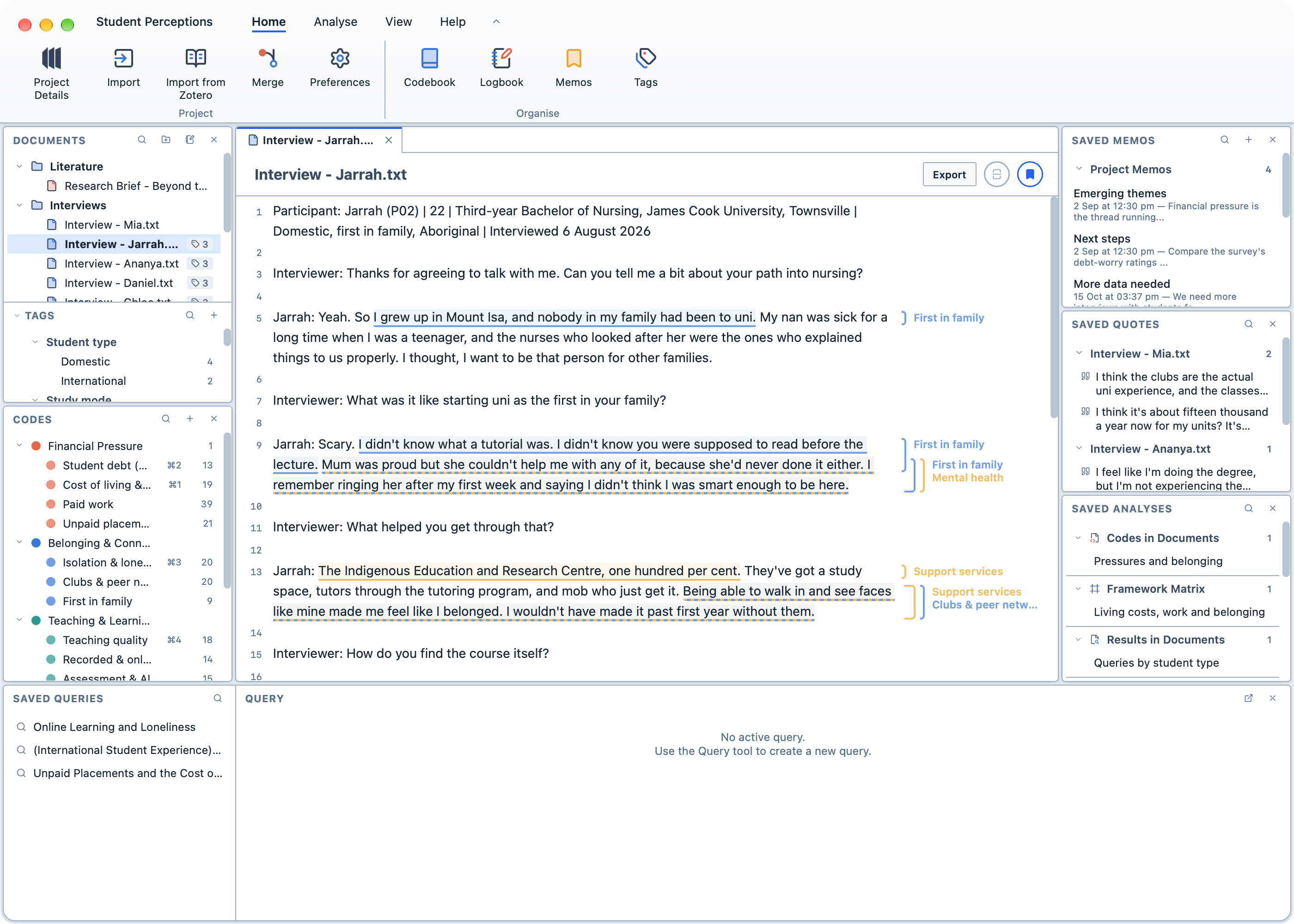
The ribbon
The ribbon groups Magnolia's commands on four tabs. Click a tab to see its buttons.
| Tab | What it contains |
|---|---|
Home | Project Details, Import, Import from Zotero, Merge and Preferences; and the Codebook, Logbook, Memos and Tags. |
Analyse | Query, which opens the Query Builder; and every analysis tool, from Codes in Documents to Reports. |
View | A button for each pane, to show or hide it. |
Help | The Manual, the Licence, and Donate. |
When a new version of Magnolia is available, a dot appears on Preferences.
On a smaller screen, or in a window less than 850 points tall, the ribbon is more compact: the group names under the buttons are hidden, and the buttons are smaller.
To fold the ribbon away:
- Double-click any tab;
- Click the arrow to the right of the tabs; or,
- Choose
View→Show Ribbonin the menu bar.
Only the tabs remain, which leaves more room for your work. While the ribbon is folded, click a tab to show its buttons; they disappear again when you click a button or anywhere else. Double-click a tab, click the arrow, or choose View → Show Ribbon again to bring the ribbon back.

TIP
If you prefer a smaller toolbar, choose Icons under Toolbar Style in Preferences → Appearance. The same commands appear as a single row of icons, with the analysis tools, panes and help in pop-up menus.
The panes
| Pane | What it contains |
|---|---|
| Documents | Your documents, folders, surveys and notebooks, with the Tags pane beneath it. |
| Codes | Your codes. See Coding your data. |
| Viewer | The document, analysis or tool you are working on, each in its own tab. |
| Saved Queries and Query | Your saved queries, and the results of the current query. See Querying your data. |
| Saved Memos | Your memos. |
| Saved Quotes | Your quotes. |
| Saved Analyses | Your saved analyses and reports. |
To show or hide a pane:
Click the
Viewtab in the ribbon.Click the pane's button. A pane that is hidden has a faded button.
You can also close a pane with the × in its heading. The Query pane can be popped out into its own window with the button next to its ×.
Themes
Magnolia has three themes, which you choose in Preferences → Appearance:
| Theme | What it looks like |
|---|---|
| Magnolia | Light, with white panes on a pale blue-grey background. This is the default. |
| Magnolia Dark | The same layout in dark colours. Magnolia starts in this theme if your computer is set to dark mode. |
| High Contrast | Black and white with yellow highlights, and no colour in the icons. Magnolia starts in this theme if your computer is set to increase contrast. |